Stop Sending Files: Build a Living GTM Operations System

Stop Sending Files. Build Something That Stays Alive.

Quick question. How many hours did your team burn last month making stuff that was already out of date by the time you hit send? The status deck. The pipeline spreadsheet. The agenda nobody actually read. The PDF that summarized... another PDF.

We got tired of paying that tax at All Great Things, so we stopped. Instead of making one more file, we built one living dashboard that updates itself and never needs redoing. Here's what it is, why it hands us hours back every week, and why I think almost every team is about to work this way.

The busywork nobody calls busywork

Most teams don't have a strategy problem. They have an "everybody's looking at a different version" problem.

The real answer lives in someone's head, or buried in a tool. To share it, you drop it in a doc. To track it, a sheet. To show it off, a deck. To talk about it, an agenda. Now you've got four copies of one truth, and all four start drifting apart the second you make them. So every week you redo them. Re-export, reformat, repaste, resend.

It feels productive. It's really just keeping copies in sync. And that's the most boring work there is, which is exactly why it shouldn't be yours anymore.

What we actually built

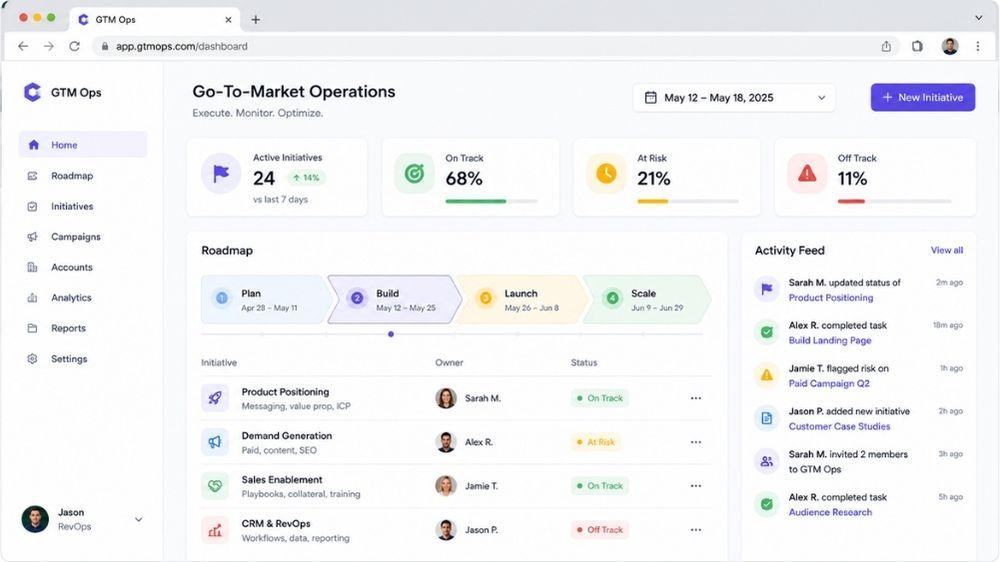
For a recent client, we threw out the pile of files and replaced it with one simple web dashboard. Not a folder. A living thing:

  • A roadmap laid out by phase, where every project shows its status, who owns it, what's blocking it, and the next move. You edit it right there in a couple of seconds.
  • A short task list and a running activity feed, so "what changed while I was out?" answers itself instead of eating the first ten minutes of every meeting.
  • A briefing section that turns the strategy, the actual why behind the work, into living pages instead of attachments you have to dig out of an email from three weeks ago.
  • A built-in time tracker that pulls hours straight from our calendar, so the client can always see where the time actually went. No timesheet theater, no end-of-month surprise.
  • An admin view that shows who's logging in and when. Sounds small, but if the dashboard is going to be the single source of truth, you need to know people are actually in it. Adoption stops being a hope and becomes something you can see.

Change one thing and it changes everywhere, for everyone, instantly. No "v4_final_actually_final." Just what's true right now. The weekly status deck didn't get better. It just stopped existing, because the dashboard is the status.

The part that quietly pays you back

The dashboard is the part you see. The part that really compounds is the automation feeding it.

Behind the scenes we set up little workflows that grab real results from the tools that already hold them (the CRM, the calendar, the ad platforms) and keep everything current without anyone touching a spreadsheet.

One example, kept vague on purpose: a marketing job that used to be a copy-paste chore every couple of weeks, basically telling an ad platform which leads actually turned into real pipeline, now just runs on its own. The right signal flows automatically, the ads start optimizing toward real revenue instead of junk form-fills, and a recurring human task quietly drops to zero. Bonus, the data got better, because software doesn't get busy and skip a week.

That's the whole game. Find the boring repeating task, turn it into a feed, and let it run forever.

So what does that actually save you?

Two things.

The obvious one: all the hours you spent making and remaking documents. Gone.

The sneaky one: the meetings that only existed to get everyone on the same page. When the page is always right, you stop meeting to sync and start meeting to decide. Those are very different meetings, and only one of them earns its spot on the calendar.

For a small team, getting back even a few hours a week per person isn't a life hack. It's a hire you didn't have to make.

Why I think everyone ends up here

I'm not the only one saying this. On a recent episode of The AI Daily Brief, "10+ Things You Should Build With AI Instead of Sending Files," Nathaniel Whittemore made the same case: emailing static documents is on its way out, and the teams that win will turn their work into living, shareable things instead.

I'd push it one step further for go-to-market teams. Picture every agency and client running off one shared, living go-to-market operations system instead of a Friday deck. Picture your "stack" not as a pile of tools you babysit, but as a few feeds keeping one source of truth honest, with a little AI doing the plumbing in between. The thing you hand over stops being a file. It becomes the system itself.

If you run an agency, that's a real edge. You're not selling slides that get skimmed once and buried. You're running something your client watches work every single day.

The fun part: you can probably build this yourself

Here's what surprised even me. A year ago this would have been a serious engineering project. Today it just isn't.

If you're even a little technical, tools like Claude Code, OpenAI Codex, and Cursor will basically build it with you. You describe what you want in plain English, it writes the app, wires up the database, and helps you ship it. The honest truth is the hardest part is deciding what your single source of truth should be, not the code.

So you've got two easy paths. Open one of those tools this weekend and try it. Take one spreadsheet you hate and turn it into a tiny live dashboard. You'll feel the difference almost immediately.

Or, if you'd rather skip the trial and error and have it done right the first time, that's literally what I do all day. Tell me which files you're sick of remaking, and I'll help you turn them into a system that runs itself.

What's coming next

I shared this and a sharp friend, Eva, fired back with a few ideas that are now firmly on the roadmap for another day.

Her best one: drop real search right into the system. Not just find-on-page, but full-text and even ask-a-question search across everything you've ever shared with a client. A pile of PDFs is basically unsearchable. A living site where someone can type "what did we agree on pricing" and land on the exact line is a genuine upgrade, not just a prettier version of the same thing. That might be the single strongest reason to work this way, and we're going to build it.

She also laid out the stuff worth thinking through before you go all in, and it was good enough that I'm just going to share it:

  • Portability. Some people still want to download, print, or forward. Give them a clean "print to PDF" path instead of fighting the instinct.
  • Stakeholders who expect a "document." Legal, procurement, and execs forwarding things upward can read a link as less formal. Meet them where they are.
  • Hosting and link rot. Be clear about where it lives, who can access it, and what happens to that link in eighteen months.
  • Sign-off and archiving. Anything that needs approval or a frozen "we agreed to this on this date" record should be snapshotted, not left as a page that keeps changing.
  • Search done right. It only shines once there's real volume, and bad search is worse than none. If it's AI-powered, keep it scoped tightly to your own content so it doesn't start making things up.

Net it out: living site by default, smart search as the killer feature, and a clean export for the moments that call for one. That's the plan.

Bottom line

If your week is full of rebuilding things that go stale the second you finish them, that's not you being disorganized. It's just the old way of working, and it's very fixable.

Stop sending files. Build something that stays alive. It's become the most valuable thing we make at All Great Things, and I think "I'll send over a deck" is going to age about as well as "I'll fax it over."

Want one built for your team, or just want a nudge to get started yourself? Reach out. I'd genuinely love to help.

FAQ

What is a living operations system?

It's one shared, always-current place (usually a simple web app) that replaces the docs, sheets, and decks you'd normally make and remake. Instead of sending files, you send a link, and it's never out of date.

Do I need to be a developer to build one?

Not really, not anymore. If you can describe what you want, tools like Claude Code, OpenAI Codex, and Cursor will write most of it with you. Start with one annoying spreadsheet and grow from there.

How is this different from Notion or a Google Doc?

Notion and Docs are great for writing things down. The difference here is automation. The system pulls real data from your other tools and updates itself, so it's not just a nicer document, it's a dashboard that reflects reality without anyone maintaining it.

What about clients or execs who still want a PDF?

Give them one. The move isn't to ban files, it's to make the living version the source of truth and offer a clean export when someone genuinely needs to print, forward, or archive.

How long does it take to set one up?

A basic version is a weekend project with the right tools. A polished, automated setup for a real client is more involved, but it's days now, not the months it would have taken a year ago.

Where does it live, and is the data safe?

You decide. It can run on your own hosting with access locked to the right people. The important part is planning for access and longevity up front, so a link you share today still works a year from now.

About Jason Mellet

Jason Mellet

All Great Things began as Jason’s answer to a pattern he kept seeing as a builder, operator, and GTM leader: companies were investing heavily in marketing and tooling, but their growth systems weren’t actually connected.

Author profile  ·  @https://x.com/JMellet77

Not Sure Where to Start With Your Strategy?

Book a free 15-min marketing strategy call.

Start Planning →